Introduction
Selecting a 3D insole printer requires more than comparing technical specifications. Orthotic manufacturers need equipment that matches their product dimensions, material requirements, design details, and production workflow.
Key factors include build volume, extrusion performance, material compatibility, printing accuracy, software support, and maintenance requirements. This guide outlines what manufacturers should evaluate before purchasing a 3D insole printer.
1. Define Your Manufacturing Requirements
Before comparing printer models, identify the products and materials the machine needs to process.
Consider these factors:
- Product dimensions: Maximum length, width, and height of your insole models.
- Materials: Required filament types and material grades.
- Design structure: Flexible structures, lattice patterns, and varying thicknesses.
- Production needs: Expected printing jobs and operating schedules.
- Digital workflow: Existing CAD software, slicing tools, and file formats.
These requirements provide a practical basis for evaluating equipment suitability.
2. Build Volume: Match the Printing Area to Your Products
Build volume determines the maximum dimensions available for a printing job. For orthotic manufacturers, the working area must accommodate the intended insole sizes and printing orientation.
However, the nominal build volume does not always equal the usable area. Model positioning, support structures, and spacing between parts can affect the available space.
Before purchasing, check:
- The largest insole model in your product range
- Required printing orientation
- Space needed for support structures
- Whether multiple components can fit in one job
For reference, a printer with a 200 × 320 × 190 mm build volume offers a defined working area. Compare this with your actual digital models before making a decision.
3. Extrusion System and TPU Processing
The extrusion system controls how filament is fed into the hot end and deposited during printing. This is particularly important when processing flexible materials such as TPU.
Dual-Gear Extrusion
A dual-gear extrusion system uses two gears to grip and feed filament. A high-torque configuration is designed to provide controlled filament feeding, making it worth evaluating for flexible material applications.
Manufacturers should check filament grip, extrusion consistency, compatibility with different filament hardness levels, and ease of maintenance.
Actual performance also depends on filament quality, temperature, print speed, and machine calibration.
Temperature Control
Different thermoplastic materials require different processing temperatures. Check whether the printer offers an adjustable temperature range suitable for your selected filament grades.
For TPU, temperature stability and the relationship between extrusion temperature and printing speed also require attention. A wide temperature range alone does not guarantee consistent results, so material testing remains important.
4. Material Compatibility
Evaluate material compatibility based on your intended products rather than the number of materials listed in the specifications.
- TPU: A flexible thermoplastic used in various 3D-printed insole structures. Check filament feeding, temperature control, and recommended printing speed. Different TPU grades may require different settings.
- PLA: Commonly used for prototypes and design verification. Its mechanical properties differ from flexible materials, so assess its suitability for each application.
- HIPS: Another thermoplastic used in additive manufacturing. Confirm compatibility with the intended grade and evaluate the finished part against product requirements.
Procurement tip: Ask the supplier to confirm supported filament specifications and provide printing guidance. Where possible, test your materials before finalizing the order.
5. Printing Accuracy and Surface Quality
Dimensional consistency is important when printed structures need to follow approved digital designs. Three factors deserve attention.
Positioning Accuracy
Positioning accuracy describes how precisely the machine moves along its X, Y, and Z axes. Check each specification separately and ask how the values are measured.
Machine calibration, mechanical construction, material shrinkage, and temperature changes can also affect finished dimensions.
Layer Thickness
Layer thickness determines the vertical increment used to build a printed structure. Smaller layers can provide finer vertical detail but may increase printing time. The appropriate setting depends on model geometry, surface requirements, and production needs.
Finished Part Quality
Do not rely on specification figures alone. Inspect printed samples for:
- Dimensional accuracy
- Layer adhesion
- Surface consistency
- Structural integrity
- Material flexibility
Sample testing offers a more practical basis for comparing equipment.
6. Dual-Station Printing Configuration
A dual-station printer may offer more flexibility than a single-station machine. However, dual-station printing does not automatically mean both stations can print simultaneously or operate independently under all conditions.
Before purchasing, confirm:
- Whether both stations support simultaneous printing
- Whether each station has independent task control
- Whether different printing parameters can be assigned
- How material feeding and temperature are managed
The actual working configuration determines whether the machine suits your production schedule.
7. Software Compatibility and Digital Workflow
A printer should integrate with the manufacturer’s existing design and production process.
File Formats and Slicing Software
STL and OBJ are commonly used to transfer 3D model geometry, while G-Code contains the instructions used by the printer.
Software such as OrcaSlicer, Cura, and Simplify3D can prepare printing jobs, depending on machine compatibility.
Before ordering, confirm supported software versions, material profiles, parameter adjustment options, and firmware compatibility.
Control and Connectivity
Touchscreen operation, PC web control, and mobile phone control provide different ways to manage printing jobs.
USB, Wi-Fi, and Ethernet connectivity should also match the factory’s network and file management requirements.
8. Machine Construction and After-Sales Support
Long-term equipment use depends on more than printing performance. Frame construction, mechanical components, extrusion assemblies, and component accessibility all affect maintenance.
A full sheet-metal frame provides a defined structural enclosure, but buyers should also check replacement part availability and servicing requirements.
Discuss the following with the supplier before ordering:
- Installation and operating instructions
- Routine maintenance procedures
- Replacement parts availability
- Technical documentation and troubleshooting
- Warranty and after-sales support
These factors should form part of the overall equipment evaluation.
9. IDEASTEP 3D Insole Printer: Technical Specifications
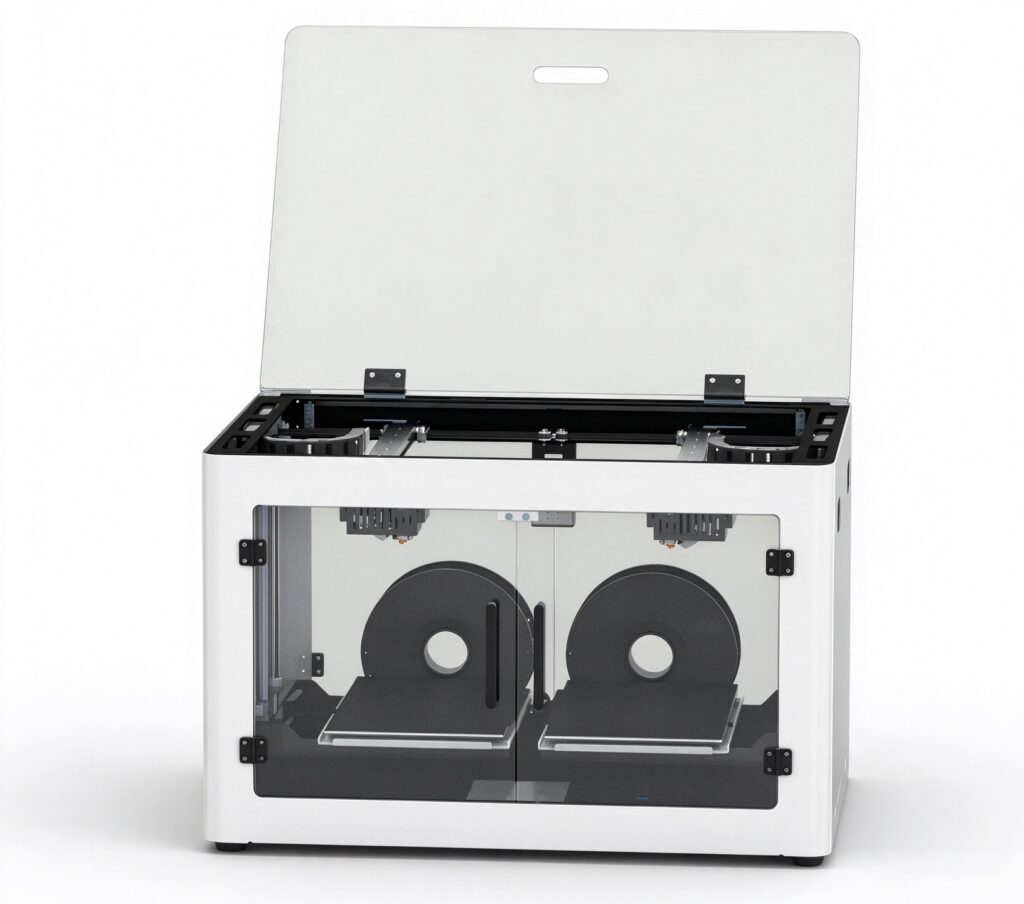
The IDEASTEP 3D Insole Printer is designed for businesses exploring 3D printing in orthotic insole manufacturing. Its configuration includes dual-station independent printing, high-torque dual-gear extrusion, and Klipper firmware.
The machine supports compatible materials including TPU, PLA, and HIPS.
Main Technical Specifications
| Parameter | Specification |
|---|---|
| Build Volume | 200 × 320 × 190 mm (XYZ) |
| Machine Dimensions | 750 × 515 × 450 mm |
| Machine Weight | 35 kg |
| Printing Structure | Dual-station independent printing |
| Print Color | Single color |
| Firmware | Klipper |
| Extrusion System | High-torque dual-gear extrusion |
| Layer Thickness | 0.1–0.6 mm |
| Nozzle Diameter | 0.6 mm (standard) |
| Printing Speed | 40–120 mm/s |
| Positioning Accuracy | X/Y: 0.11 mm; Z: 0.025 mm |
| Supported Materials | PLA, TPU, HIPS, etc. |
| Extruder Temperature | 175–260°C, adjustable |
| Heated Bed Temperature | 0–100°C, adjustable |
| Display | 5-inch full-color capacitive touchscreen |
| Frame | Full sheet-metal construction |
| Control Methods | Touchscreen, PC web control, mobile phone control |
| Software | OrcaSlicer, Cura, Simplify3D |
| File Formats | STL, OBJ, G-Code |
| Connectivity | USB, Wi-Fi, Gigabit Ethernet |
| Input Voltage | 100–220 V, 50/60 Hz |
| Power | 350 W |
| Certifications | CE, FCC, RoHS |
Equipment Operation Demonstration
The IDEASTEP 3D Insole Printer combines a dual-station structure with a high-torque dual-gear extrusion system. Its touchscreen, PC web control, and mobile phone control provide several operating options.
Watch the operation demonstration for an overview of machine setup, operating procedures, and the printing workflow.
10. Questions to Ask Before Ordering
Before placing an order, discuss these practical points with the equipment supplier:
Can the printer process our TPU grade?
Confirm the supported filament specifications, recommended temperature settings, and printing parameters. Test different TPU grades if your production requires them.
Can the build volume accommodate our largest insole model?
Provide the supplier with your actual model dimensions and confirm the available printing area and orientation.
Can both stations operate independently and simultaneously?
Ask for details about task control, station management, and the actual working configuration.
Is the printer compatible with our software?
Check supported file formats, slicing software, material profiles, and parameter adjustment options.
What support is available after delivery?
Confirm installation guidance, maintenance instructions, spare parts, and warranty arrangements.
11. Discuss Your 3D Insole Printer Requirements with IDEASTEP
Choosing a 3D insole printer means matching equipment capabilities with actual product dimensions, materials, and production requirements.
IDEASTEP provides 3D insole printing equipment for orthotic manufacturers, distributors, and footwear businesses exploring additive manufacturing.
Contact our team to discuss printer specifications, material compatibility, and equipment requirements for your manufacturing operation.
Related Articles: 3D Insole Printing: Equipment, Technology and Applications in Orthotic Manufacturing.