
3D printing is providing orthotic manufacturers with another way to develop and produce customized insoles. By building products layer by layer from digital models, additive manufacturing allows greater flexibility in structural design, model revisions, and small-batch production.
For insole manufacturers, footwear brands, and orthotic product suppliers, adopting this technology involves more than selecting a printer. Material compatibility, build volume, extrusion performance, software integration, and production requirements all need to be considered.
This guide examines the main aspects of 3D insole printing, from material selection and equipment configuration to manufacturing applications and printer selection.
1. How 3D Insole Printing Works
3D insole printing uses additive manufacturing technology to build an insole structure from a digital model. The printer deposits material layer by layer according to the geometry defined in the design file.
A typical production workflow involves three stages:
- Digital design: Create or modify the insole model using CAD software or a specialized orthotic design system.
- Model preparation: Import the design into slicing software, configure printing parameters, and generate the G-code file.
- Printing: Load the selected material and produce the physical structure according to the configured parameters.
Once the digital model is established, manufacturers can revise dimensions, arch geometry, heel cup profiles, and other structural details without redesigning the entire production process. Digital files also provide a consistent reference for repeat orders and product revisions.
2. Manufacturing Applications of 3D Insole Printing
3D printing is particularly relevant to manufacturers developing customized insole structures or managing multiple product designs. Its applications depend on the selected material, printer configuration, and mechanical requirements of the finished product.
2.1 Customized Structural Design
Digital modeling allows manufacturers to adjust key insole features, including arch contours, heel cup dimensions, forefoot thickness, and surface geometry. These adjustments support the development of different product specifications without requiring dedicated tooling for every design change.
For OEM and ODM production, this flexibility can simplify the development of different insole models and customer-specific designs.
2.2 Lattice and Lightweight Structures
Additive manufacturing makes it possible to incorporate lattice patterns, internal cavities, and other complex geometries into an insole design. These structures can be difficult to reproduce through some conventional manufacturing processes.
However, structural design must account for material properties, load distribution, layer adhesion, and mechanical performance. Prototype testing is necessary before using these designs in commercial production.
2.3 Digital Production and Model Revisions
Digital files allow manufacturers to store, modify, and reproduce product designs. Different sizes, structural variations, and customer specifications can be managed through separate model versions.
This approach is useful for businesses handling customized orders or maintaining a varied product range.
3. Materials for 3D Insole Printing
Material selection directly affects printability, flexibility, durability, and the mechanical properties of the finished insole. Manufacturers should evaluate the filament grade and its processing requirements rather than relying on the material name alone.
3.1 TPU (Thermoplastic Polyurethane)
TPU is a flexible thermoplastic commonly used in 3D printing. Its elasticity and flexibility make it suitable for developing various flexible insole structures.
When evaluating TPU for production, manufacturers should consider:
- Shore hardness and material flexibility
- Filament diameter and feeding consistency
- Recommended extrusion temperature
- Printing speed and layer adhesion
- Dimensional stability and finished-part performance
Different TPU formulations can produce significantly different printing results. Material-specific temperature and speed settings should be established through testing.
3.2 PLA (Polylactic Acid)
PLA is widely used for 3D printing prototypes and design samples. Its relatively straightforward processing makes it useful for checking model dimensions, geometry, and printing parameters before selecting a production material.
Its mechanical properties differ from those of flexible thermoplastics, so manufacturers should assess its suitability for the intended application.
3.3 HIPS (High Impact Polystyrene)
HIPS is another thermoplastic used in additive manufacturing. Its processing characteristics and mechanical properties differ from TPU and PLA.
Before using HIPS in insole production, manufacturers should verify material compatibility, structural requirements, and the intended application.
Material selection should be based on actual printing trials and product testing. Compatibility with a printer does not automatically establish suitability for every insole design.
4. Key Features of a 3D Insole Printer
Equipment configuration determines which materials and product designs a printer can handle. For orthotic manufacturers, the following specifications deserve particular attention.
4.1 Dual-Station Independent Printing
A dual-station configuration provides two separate printing stations within one machine. It can offer more flexibility when organizing printing jobs and managing different models.
Buyers should confirm whether both stations can operate simultaneously, whether each station supports independent task control, and how printing parameters are managed.
4.2 High-Torque Dual-Gear Extrusion
The extrusion system controls filament feeding and material deposition. A high-torque dual-gear mechanism is designed to provide stable filament feeding, which is an important consideration when processing flexible materials such as TPU.
Extruder design, hot-end temperature control, and filament compatibility should be evaluated together, particularly when TPU is part of the intended production process.
4.3 Klipper Firmware
Klipper is a 3D printer firmware platform used for motion control and machine configuration. Its integration provides a configurable control environment for managing printing operations.
Manufacturers should also review firmware configuration, available control functions, and compatibility with their existing printing workflow.
4.4 Build Volume and Printing Accuracy
Build volume determines the maximum working dimensions available for a printing job. For insole manufacturing, the usable area must accommodate the required product size and printing orientation.
Layer thickness and positioning accuracy also affect the finished geometry. Actual results depend on machine calibration, material behavior, model design, and slicing parameters. Sample testing is therefore more informative than relying on specification figures alone.
4.5 Software and Connectivity
Compatibility with design files and slicing software helps integrate a printer into an existing digital workflow.
Common file formats include STL, OBJ, and G-Code. Depending on the machine configuration, touchscreen operation, PC web control, mobile control, USB, Wi-Fi, and Ethernet may also be available.
5. What to Consider When Choosing a 3D Insole Printer
Equipment selection should start with the manufacturer’s product range and production requirements. The following factors provide a practical basis for comparing machines.
5.1 Build Volume
Check whether the printing area accommodates the largest intended insole model. Product dimensions, model orientation, and the number of parts placed in each printing job all affect the usable build area.
5.2 Material Compatibility
Identify the filament types and grades required for production. Check the extruder temperature range, heated bed capability, feeding mechanism, and recommended printing profiles. For TPU applications, consistent filament feeding and suitable extrusion settings are particularly important.
5.3 Printing Speed and Accuracy
Printing speed affects job scheduling, while positioning accuracy and layer thickness influence dimensional results. Actual production time also varies with model geometry, infill settings, material characteristics, and slicing parameters.
Ask suppliers for sample prints and technical details to assess whether the machine meets the required product specifications.
5.4 Software Compatibility
Confirm that the printer works with the design and slicing software used by your production team. File format compatibility, parameter adjustment, and workflow management are important when handling multiple product models.
5.5 Machine Construction and Maintenance
Frame construction, component accessibility, extrusion system design, and cooling configuration all affect equipment maintenance. Buyers should review routine maintenance requirements and the availability of replacement components before purchasing.
6. IDEASTEP 3D Insole Printer for Orthotic Manufacturing
IDEASTEP offers a 3D Insole Printer designed for businesses developing digital orthotic manufacturing processes. The machine combines dual-station independent printing, a high-torque dual-gear extrusion system, and Klipper firmware.
Its configuration supports the evaluation of different insole designs and compatible thermoplastic materials, including TPU, PLA, and HIPS.
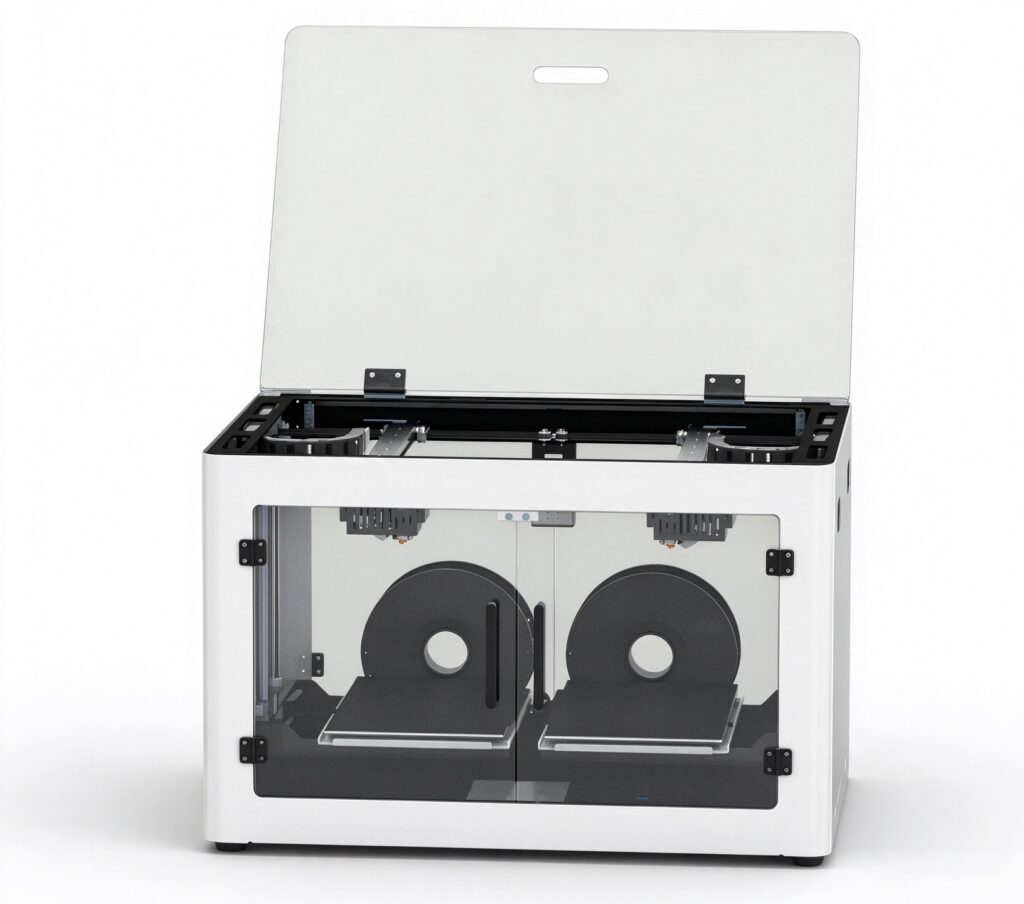
6.1 Main Technical Specifications
| Parameter | Specification |
|---|---|
| Build Volume | 200 × 320 × 190 mm (XYZ) |
| Machine Dimensions | 750 × 515 × 450 mm |
| Machine Weight | 35 kg |
| Printing Structure | Dual-station independent printing |
| Print Color | Single color |
| Firmware | Klipper |
| Extrusion System | High-torque dual-gear extrusion |
| Layer Thickness | 0.1–0.6 mm |
| Nozzle Diameter | 0.6 mm (standard) |
| Printing Speed | 40–120 mm/s |
| Positioning Accuracy | X/Y: 0.11 mm; Z: 0.025 mm |
| Supported Materials | PLA, TPU, HIPS, etc. |
| Extruder Temperature | 175–260°C, adjustable |
| Heated Bed Temperature | 0–100°C, adjustable |
| Display | 5-inch full-color capacitive touchscreen |
| Frame | Full sheet-metal construction |
| Control Methods | Touchscreen, PC web control, mobile phone control |
| Software | OrcaSlicer, Cura, Simplify3D |
| File Formats | STL, OBJ, G-Code |
| Connectivity | USB, Wi-Fi, Gigabit Ethernet |
| Input Voltage | 100–220 V, 50/60 Hz |
| Power | 350 W |
| Certifications | CE, FCC, RoHS |
6.2 Equipment Configuration
The machine features a 200 × 320 × 190 mm build volume and a full sheet-metal frame. Its high-torque dual-gear extrusion system and adjustable hot-end temperature support printing with compatible thermoplastic materials.
A 5-inch capacitive touchscreen provides direct operation. PC web control and mobile phone control offer additional operating options, while USB, Wi-Fi, and Gigabit Ethernet support different file transfer and connectivity requirements.
6.3 Operation Demonstration
Review the IDEASTEP 3D Insole Printer operation demonstration to see the machine setup, operating procedures, and printing workflow. The video provides a practical reference for manufacturers evaluating the equipment for their production requirements.
7. Integrating 3D Printing into Existing Insole Production
3D printing can complement established manufacturing processes rather than replace every conventional production method. Depending on product requirements, manufacturers may use it alongside EVA processing, CNC milling, molding, and manual fabrication.
A practical implementation process includes:
- Product assessment: Identify which insole models and structures are suitable for additive manufacturing.
- Digital modeling: Prepare product geometry and confirm dimensions before printing.
- Material testing: Select suitable filament grades and verify their processing characteristics.
- Parameter adjustment: Configure extrusion temperature, bed temperature, layer thickness, and printing speed.
- Sample evaluation: Check dimensions, surface quality, layer adhesion, and mechanical performance.
- Process standardization: Establish suitable model files and printing profiles for repeat production.
For manufacturers handling different product specifications, this approach provides a controlled way to evaluate 3D printing before expanding its role in production.
8. Frequently Asked Questions About 3D Insole Printing
What materials can a 3D insole printer process?
Material compatibility depends on the printer configuration and filament properties. The IDEASTEP 3D Insole Printer supports PLA, TPU, HIPS, and other compatible materials. Specific filament grades should be tested before production.
What is the build volume of the IDEASTEP 3D Insole Printer?
The build volume is 200 × 320 × 190 mm (XYZ). Manufacturers should consider product dimensions and printing orientation when assessing the available working area.
Which slicing software is supported?
The printer supports OrcaSlicer, Cura, and Simplify3D. Compatible file formats include STL, OBJ, and G-Code.
Is the printer compatible with flexible TPU filament?
Yes. TPU is one of the supported materials. The machine features a high-torque dual-gear extrusion system and an adjustable extruder temperature range of 175–260°C. Actual settings depend on the TPU grade and manufacturer’s recommendations.
What should manufacturers check before purchasing?
Key considerations include build volume, material compatibility, extrusion configuration, printing accuracy, software support, connectivity, maintenance, and sample printing performance. Buyers should also confirm the machine’s operating capabilities against their specific production requirements.
9. Discuss Your 3D Insole Printing Requirements with IDEASTEP
Choosing a 3D insole printer requires more than comparing machine specifications. Material requirements, product geometry, software compatibility, and production workflow all influence equipment suitability.
IDEASTEP works with businesses in the orthotic and foot care industries and provides equipment solutions for 3D insole manufacturing applications.
If you are evaluating 3D printing equipment for your manufacturing business, contact our team to discuss machine specifications, material compatibility, and your intended production applications.
Product links: https://www.aideastep.com/product/ideastep-3d-insole-printer-with-dual-station-independent-printing-and-high-torque-extrusion/.


